First loop
Tell the agent how the loop should run.
After install, assign roles. Init seeds the agent. /arthur-loop is the interview. Then arthur or Run next calls the next role.
1. Create an instance
mkdir ~/my-loop && cd ~/my-loop
arthur init
Init asks which detected CLI is the main agent and which preset you want:
| Preset | Shape |
|---|---|
guided | Default. Manual adapters as a working base; your main agent finishes the setup. |
solo | One shipped agent plans and implements (Codex, Claude Code, or Grok Build). |
pair | Main agent implements; a second shipped agent reviews. |
browser-advisor | A browser AI (for example ChatGPT Pro) plans and reviews; your main agent implements. |
custom | Pick each adapter yourself. |
Init writes agent-setup/KICKOFF.md and the skill. Restart the coding agent so MCP is connected.
2. Run /arthur-loop
In Claude Code, Codex, Cursor, or Grok Build, invoke the installed skill or slash command. It asks, one topic at a time:
- Project id (
SHOUTY_SNAKE) and a one-line goal - Planner — scopes the packet. Optional model, e.g.
grok - Implementer — plans and builds. e.g.
claude-code - Reviewer — plan and sprint review. e.g.
claude-code:opus - QA — optional.
noneskips that hop - Tracker —
atlas-tasker,command, ornone
Then it creates the loop with MCP arthur.loop.create. Arthur formulates the default hop sequence. Drive it with arthur, arthur run, or arthur.follow.run.
arthur roles set reviewer=claude-code:opus
arthur loop create --project-id MY_APP --from-ticket AUTH-2 \
  --role planner=grok --role implementer=claude-code --role reviewer=claude-code:opus
arthur
arthur run
Same path in the console: arthur web → Roles, + Loop, Run next. Setup detail: Roles and run. If the tracker is Atlas Tasker and tickets are ready, arthur tracker walk opens them as queue jobs. in_review is not ready work.
On a Mac, a separate installer puts quota in the menu bar: percent left for the agents in the loop, plus a badge when a decision or stale job needs you. pipx/uv/curl do not install it.
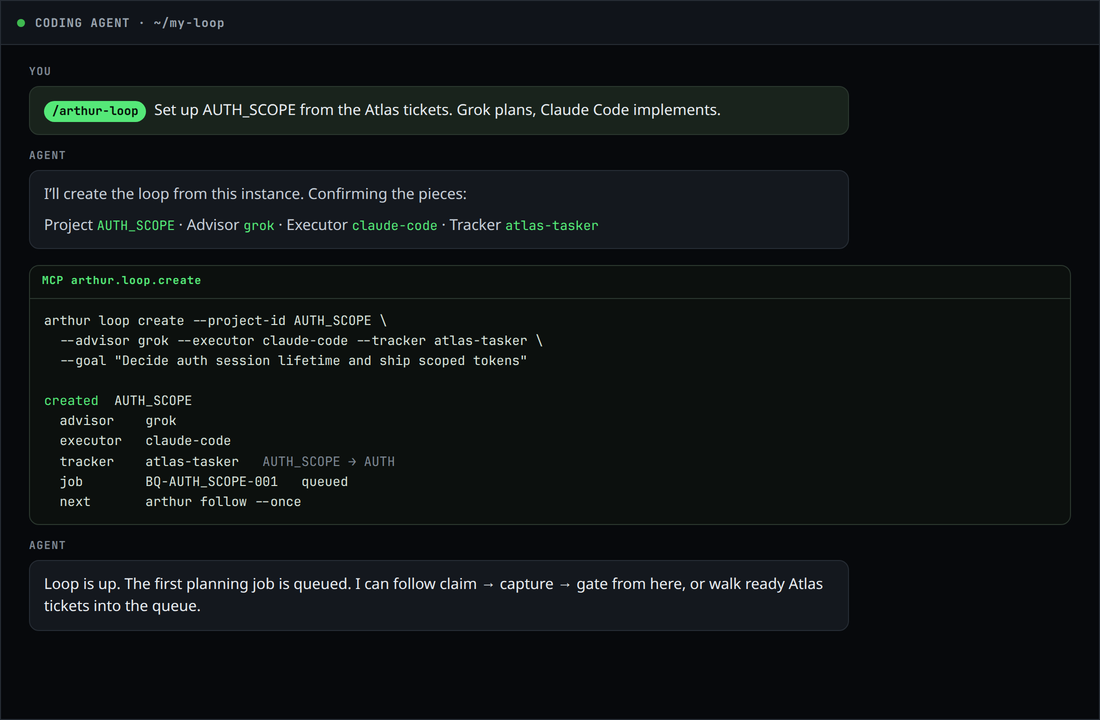
arthur.loop.create.3. What stays human
Follow will not skip an open human decision, invent an APPROVE_PLAN when the implementation gate is NO-GO, or headlessly drive ChatGPT-browser / manual inboxes. Those pause the project and surface on arthur status and the Needs you rail.
Look first, if you want
arthur init --yes --demo
arthur status
arthur web
The demo is a busy dashboard, not a working agent loop. Use it to learn the map, then run the interview on a real instance.