Open source · MIT · v0.1.1
Install once.Your agent runs the loop.
File-first control plane for AI dev loops — bring your own advisor, executor, and tracker. Assign planner, implementer, reviewer, and QA. arthur runs the next hop.
- Claude Code
- Codex
- Cursor
- Grok Build
Python 3.9+ · macOS and Linux · core needs no API key
- MIT licensed
- JSONL state
- localhost console
- Planner scopessaved first
- Implementer buildsone packet
- Reviewer gatesrequired
- QA checksoptional
- Human decidesproject-scoped
01 / HOW IT WORKS
Three steps. Then the agent drives.
You do not wire the queue by hand unless you want to. Install the CLI, let init seed your agents, then describe the loop from inside the agent you already use.
-
01 — INSTALL
One command, isolated
arthurpipx, uv, or the shell installer. Python 3.9 or newer is the only core requirement. No hosted account.
-
02 — INIT
arthur initwrites the skillIt detects Claude Code, Codex, Cursor, and Grok Build, copies adapter packs, writes
/arthur-loopwhere those clients load skills, and registersarthur mcp serve. Restart the client so MCP connects. -
03 — /ARTHUR-LOOP
Specify the loop in the agent
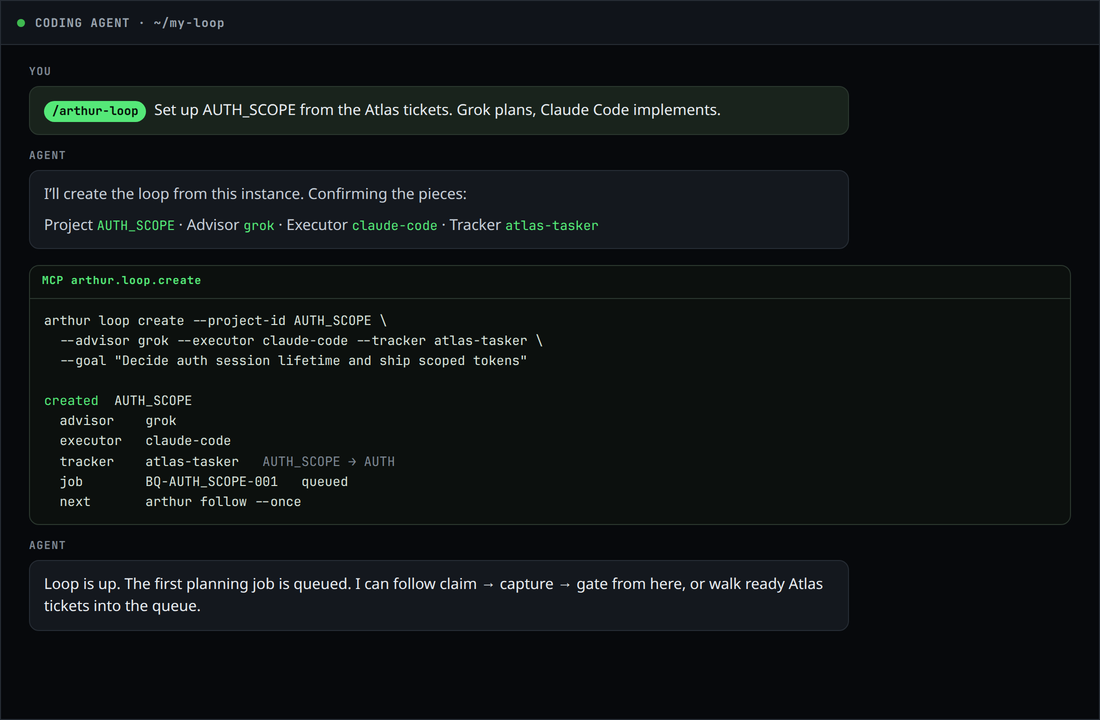
Run
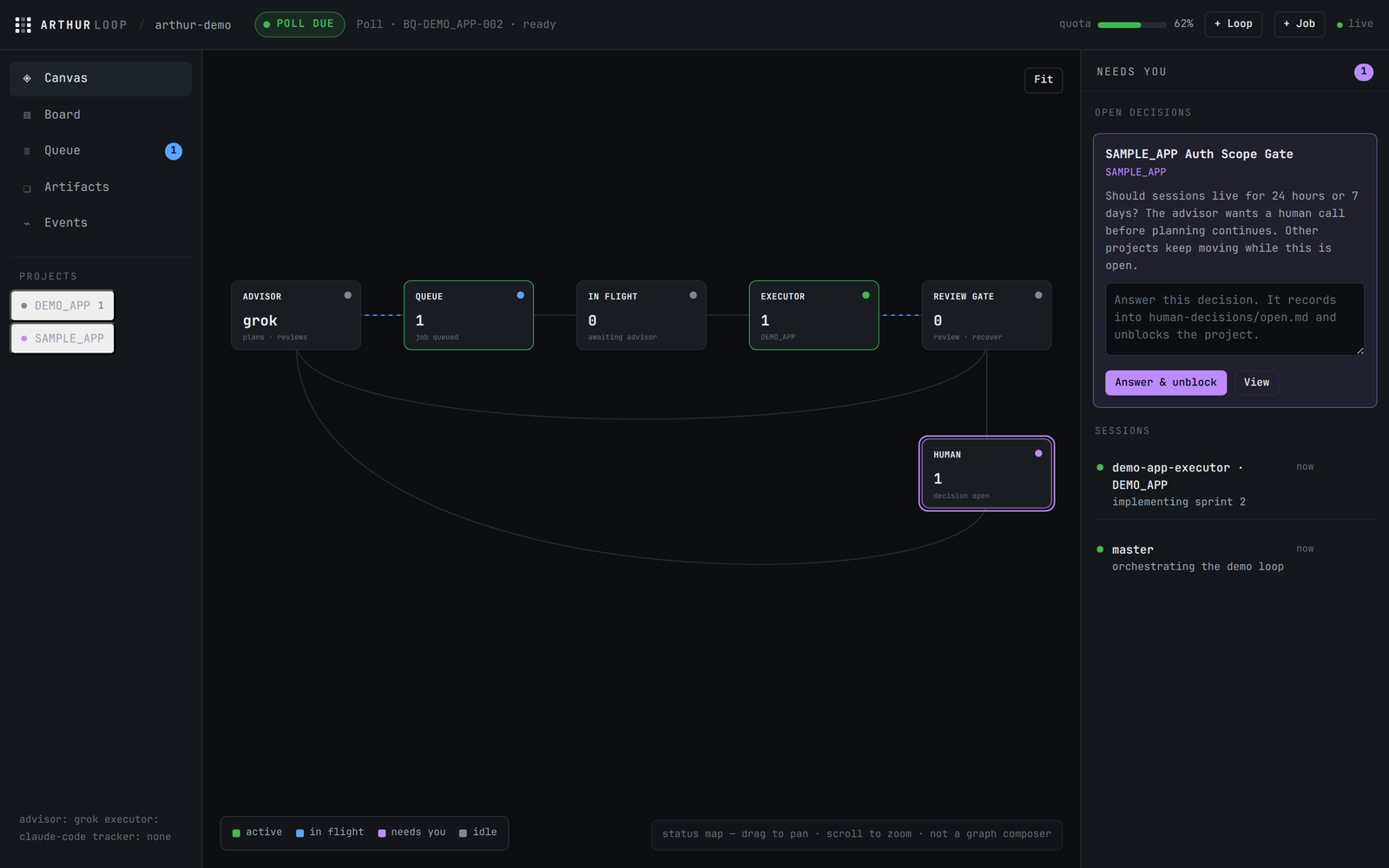
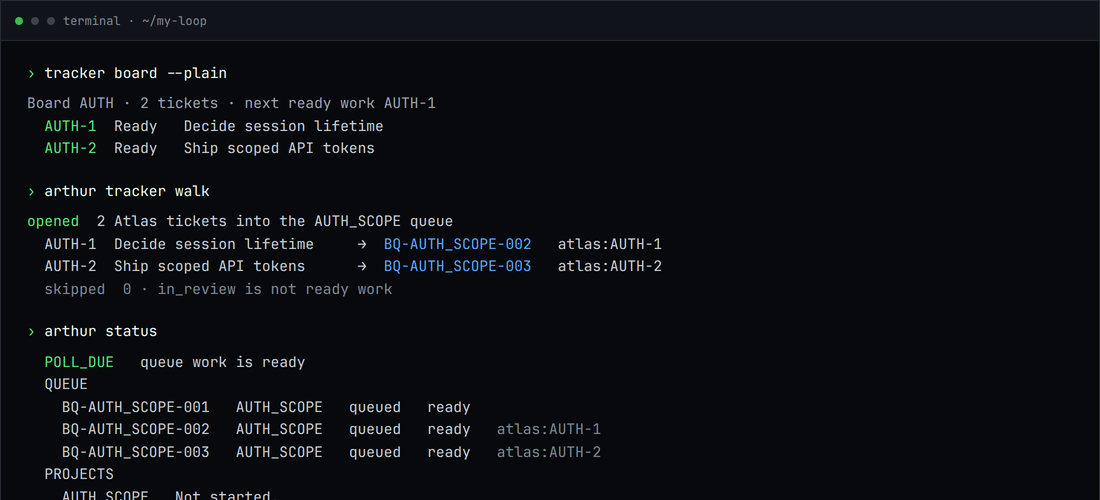
/arthur-loop. Assign planner, implementer, reviewer, and QA. Arthur formulates the default sequence. Thenarthuror console Run next calls the next agent. Same wizard:arthur web. Ready Atlas Tasker tickets walk in witharthur tracker walk.
02 / THE SEAMS
The handoffs are the product.
Arthur Loop does not choose your models. It keeps the work between them inspectable, recoverable, and gated.
Crash without amnesia
Append-only queue ledgers and saved artifacts replay to the last recorded step. Recovery frees the dead manager's lease.
Gate untrusted output
Advisor and executor text is stored before use. Only the final fenced control block is parsed. Unexpected values are quarantined and open a human decision.
Block one project
A human question pauses the project that asked it. Other projects keep moving through the same loop.
See the same state twice
arthur status, JSON output, MCP tools, and the localhost console read the same files. No database sits in the middle.Bring your stack
Shipped packs for Codex, Claude Code, and Grok Build. Cursor gets skills and MCP. Atlas Tasker can walk ready tickets. Manual and ChatGPT-browser advisors remain first-class.
03 / CONSOLE
A status map, not a graph composer.
arthur web is the browser twin of arthur status. Assign roles, run the next hop, answer decisions, recover stale jobs, create a loop. Agents own the hop itself.
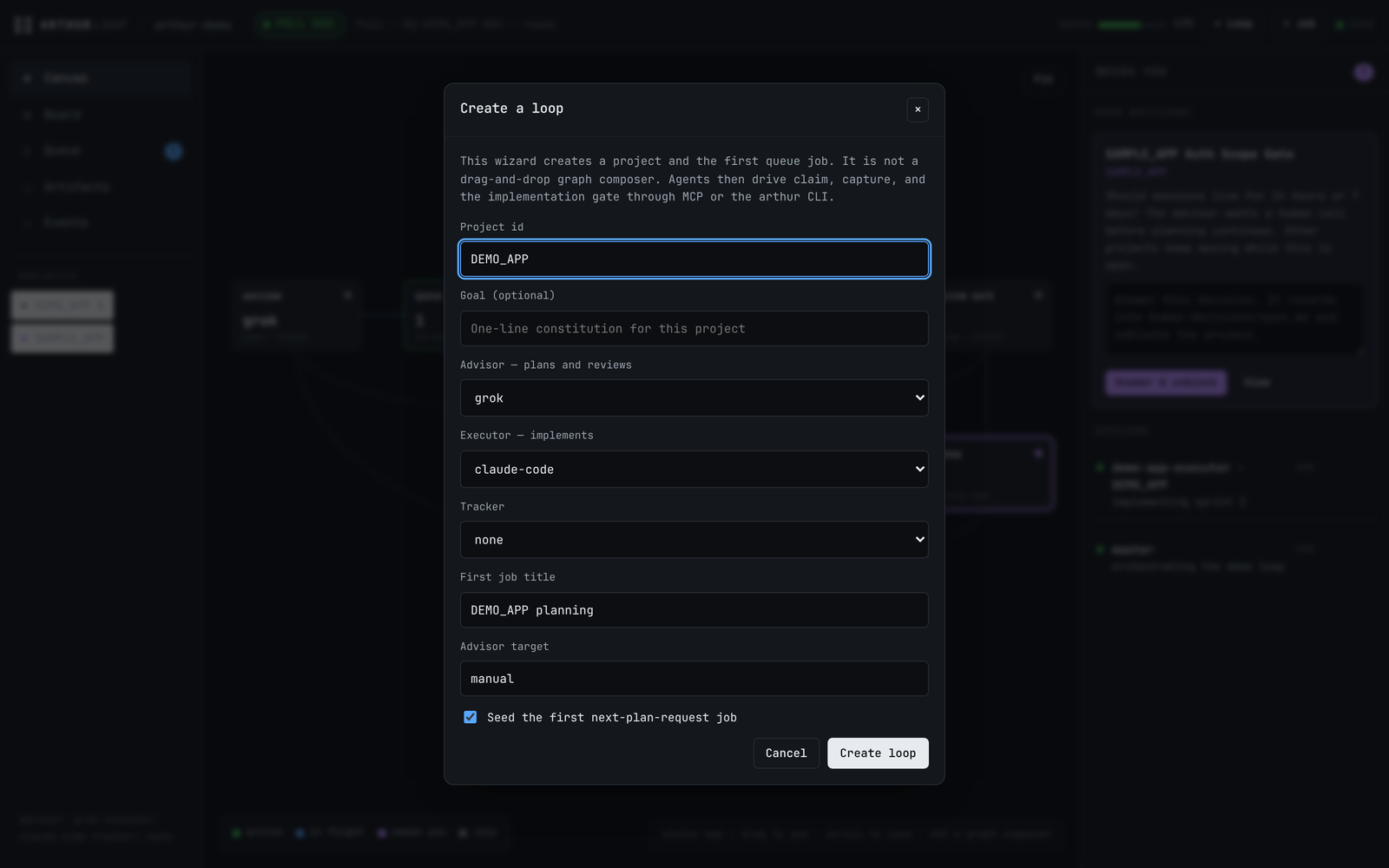
/arthur-loop and arthur loop create. A form, not a drag-and-drop graph.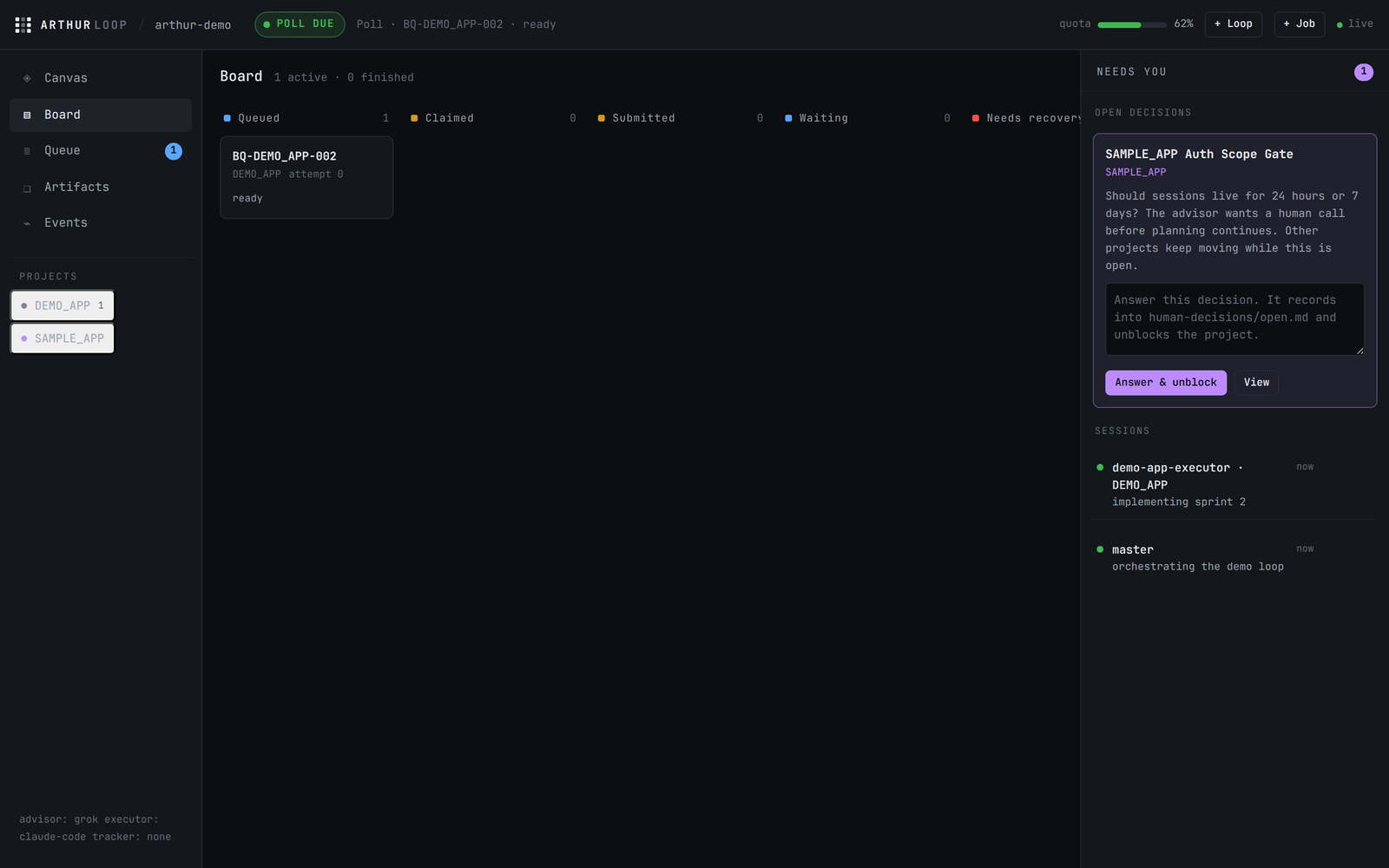
04 / MENU BAR
Watch quota from the Mac menu bar.
ArthurBar is a Mac-only extra. The popover's quota bar is the loop's governor sitting next to the clock: percent left, reset time, GREEN / YELLOW / RED for the agents you configured. You do not open the console to see how much subscription is left. At the reserve line the loop checkpoints instead of starting new work.
Quota, always visible
The same meter as
arthur status. Point the governor at CodexBar (Codex, Claude, and the other subscriptions CodexBar already reads) or at a command or file. Remaining percent and reset time stay in the menu bar while agents run.It taps you when you are needed
The ∞ icon badges with open human decisions and stale jobs. Hover for the loop state. Want a banner as well?
arthur watchposts to Notification Center on decisions, quota blocks, due work, and stale jobs.Separate Mac install
pipx, uv, and the CLI
curl | shdo not install ArthurBar. Afterarthuris on the machine, run the macOS 14+ installer below. It builds from source with Swift. There is no Homebrew cask or signed app yet.
Then ArthurBar --root ~/my-loop. From a checkout: ./menubar/install.sh --root ~/my-loop. Add --login to start at login. Uninstall: rm ~/.local/bin/ArthurBar.
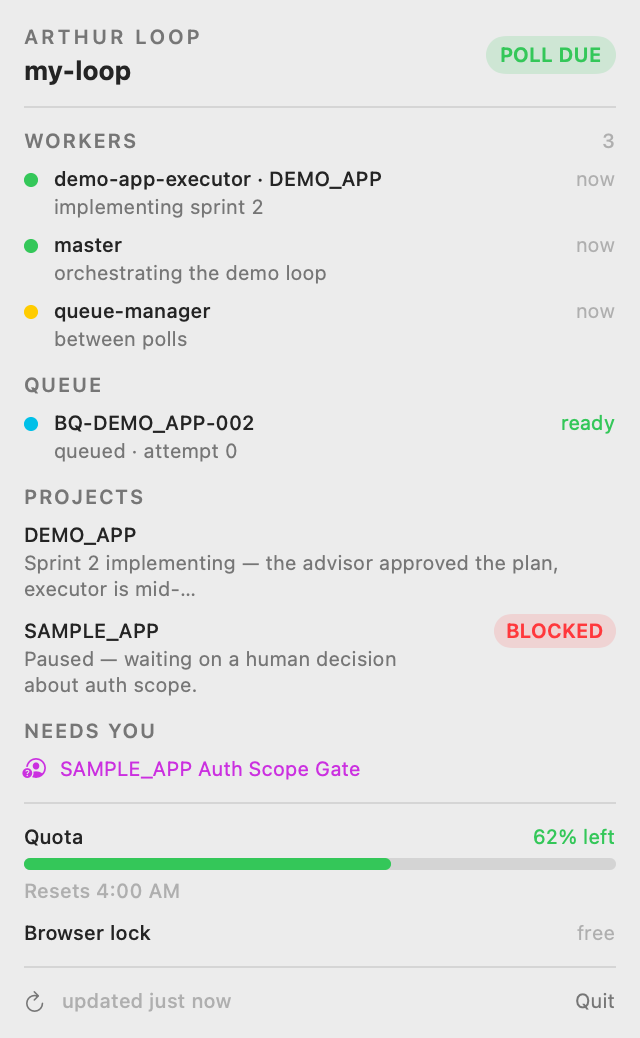
arthur status. SAMPLE_APP is blocked, so the menu extra badges 1.05 / INSTALL
One tool. Three paths.
Each method installs an isolated arthur command from current main. Then arthur init is the whole setup.
Then: mkdir ~/my-loop && cd ~/my-loop && arthur init. Restart your coding agent, run /arthur-loop, and say how you want the loop set up. Impatient? arthur init --demo && arthur web opens a seeded console. arthur --version prints arthur 0.1.1 (release notes). The Mac menu bar is a separate install.
06 / FAQ
Before you wire it in.
What do I get after one install?
An isolated arthur command. arthur init detects Claude Code, Codex, Cursor, and Grok Build, writes the arthur-loop skill and slash command where those clients load them, and registers a local MCP server. In the agent you run /arthur-loop to assign planner, implementer, reviewer, and QA. You also get a durable queue, artifact store, approval gates, human decisions, arthur status, and a localhost web console.
Is Arthur Loop free?
Yes. Arthur Loop is MIT licensed and has no paid tier.
Where is my data stored? Does it phone home?
Queues, artifacts, decisions, sessions, and quota snapshots stay as markdown and JSONL inside the instance directory you choose. The core does not phone home or require an API key. Adapters only invoke tools you configure.
How do I set up the loop in my agent?
Install Arthur Loop, run arthur init in an empty directory, restart the coding agent so MCP connects, then run /arthur-loop. The skill interviews you for project, roles, and tracker, creates the loop, and arthur run invokes the next assigned agent.
Which platforms are supported?
The Python CLI is exercised on macOS and Linux with Python 3.9 or newer. Windows is experimental. ArthurBar requires macOS 14 or newer.
Can I watch the loop from the Mac menu bar?
Yes. ArthurBar is a separate macOS 14+ install — pipx, uv, and the CLI curl installer do not include it. After arthur is installed: curl -fsSL https://raw.githubusercontent.com/myrrazor/arthur-loop/main/menubar/install.sh | sh then ArthurBar --root ~/my-loop. The popover's quota bar is the loop's governor: percent left, reset time, and GREEN / YELLOW / RED for the agents you configured. At the reserve line the loop checkpoints. The infinity icon badges when a human decision or stale job needs you.
How do I update or uninstall it?
Repeat the pipx, uv, or curl install command to update (add --force for pipx or uv). Uninstall with pipx uninstall arthur-loop or uv tool uninstall arthur-loop. Curl installs can be removed by deleting ~/.arthur-loop and ~/.local/bin/arthur.
How do I get support?
Open a GitHub issue for bugs and questions. There is no email support inbox on this site.