Open source · v0.2.0
Keep your coding agents on the same plan.
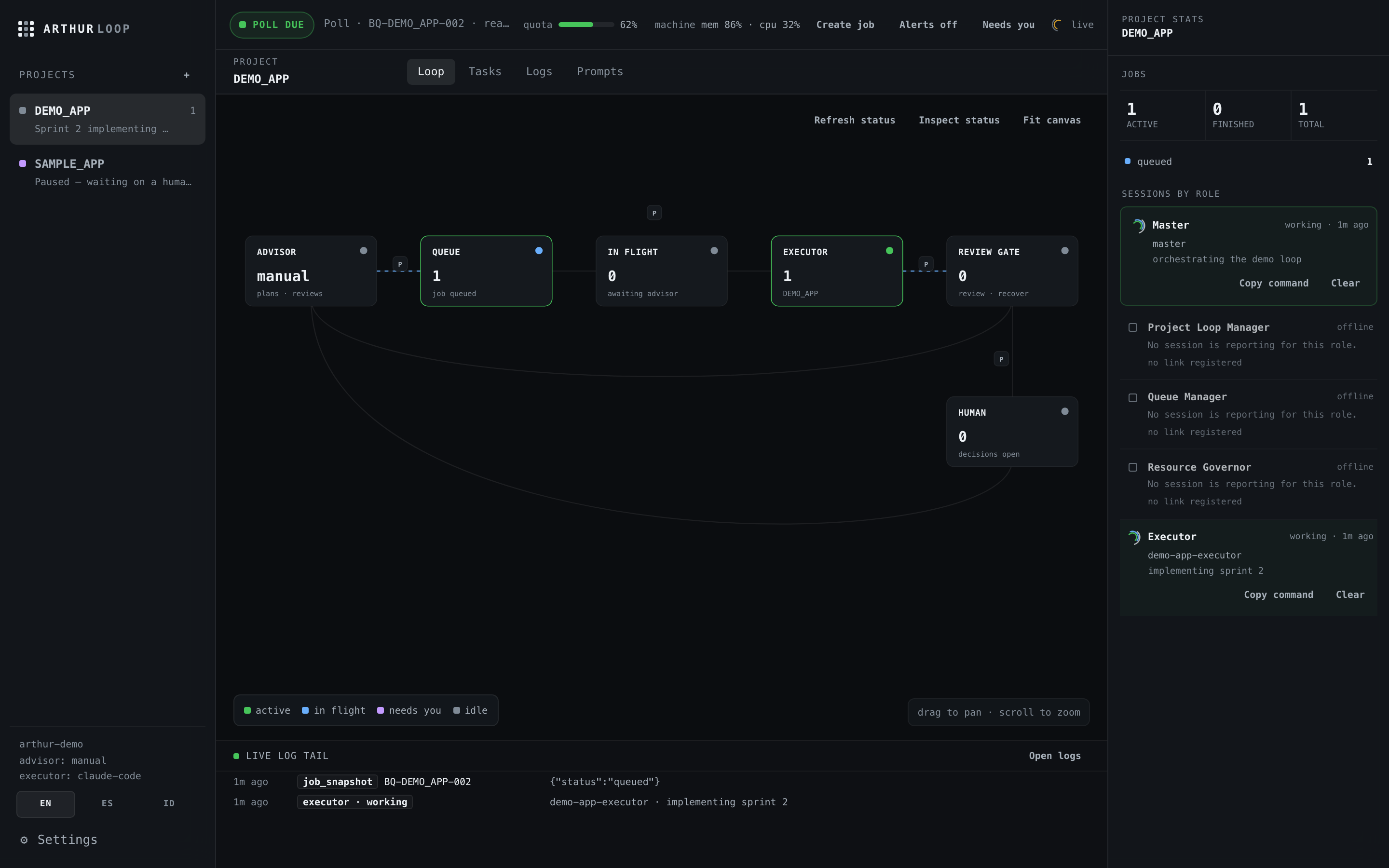
Choose a lead agent, queue the work, and follow each build and review from one local console. Arthur Loop records the handoffs, shows your resource limits, and pauses for decisions that need you.
Python 3.9+ · macOS and Linux · Windows experimental · core needs no API key
- MIT licensed
- JSONL state
- localhost web console
- Advisor planssaved first
- Queue recordsidempotent
- Executor worksone packet
- Review gaterequired
- Human decidesproject-scoped
01 / WHAT YOU GET
One loop. Your rules.
Run your existing agents through a shared queue. See what each one is doing, review its output, and resume unfinished work from the saved record.
Resource checks before new work
The console shows available quota readings alongside memory and CPU use. Your configured reserve tells the loop when to checkpoint and wait instead of starting another job.
Your choice of lead agent
Claude Code and Codex include playbooks. The setup wizard also detects Grok, Gemini, Goose, and OpenClaw and can prepare their starting files.
Preset prompts you can edit
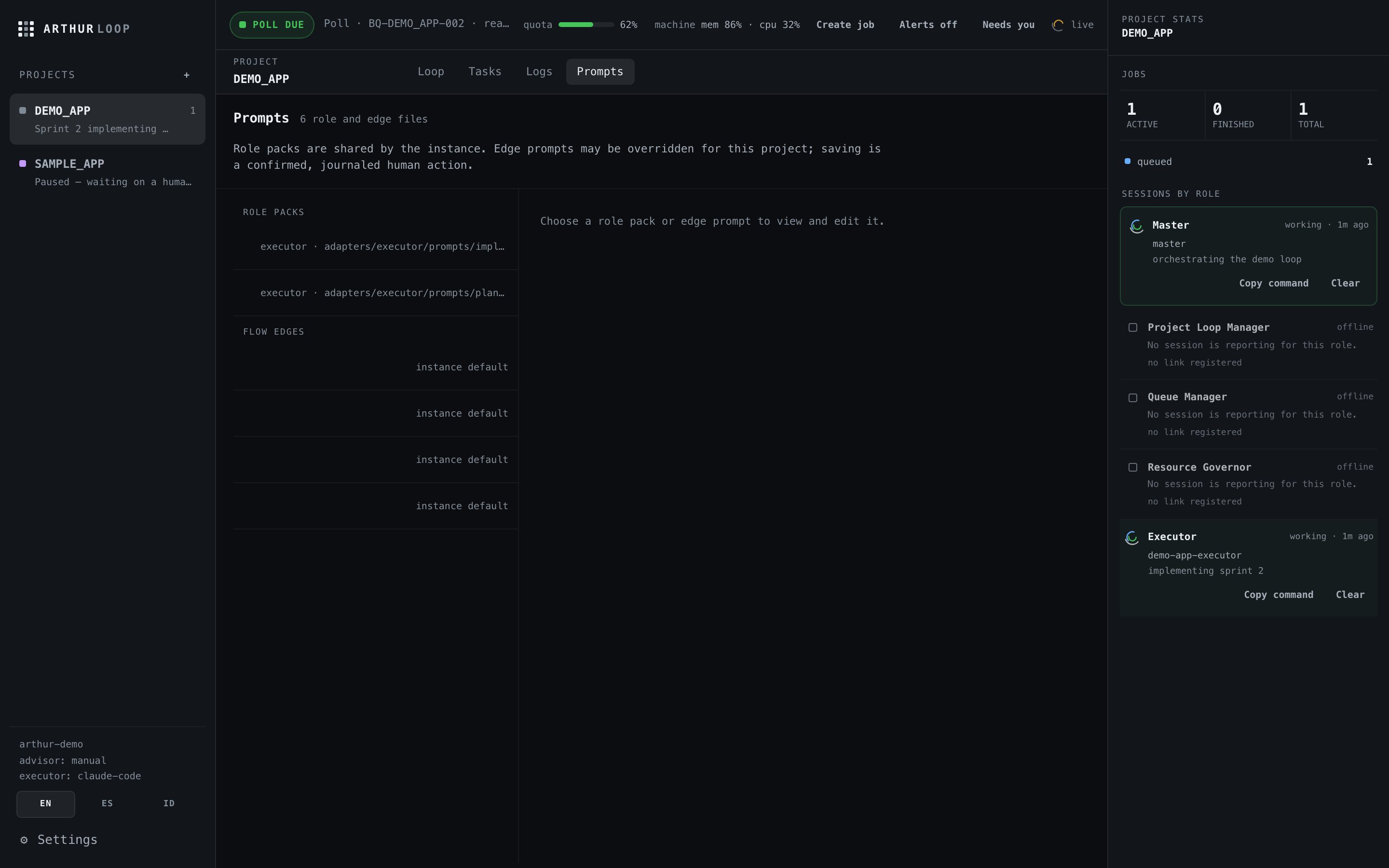
Every handoff in the loop has a written prompt: plan requests, reviews, implementation packets. Edit any of them in the console, per project, without touching code.
Approval gates and receipts
Agent output is saved before anything acts on it, review gates are required, and a human question pauses only the project that asked. Every hop lands in plain files you can read.
A record you can resume
Append-only files keep the recorded queue state after an interruption. You can inspect unfinished jobs before deciding what to resume.
02 / INSTALL
One tool. Three paths.
Each method installs an isolated arthur command. Pick the package tool already on your machine.
Each install gives you the same arthur command. The first loop takes four of them. Windows support is experimental — see the FAQ for what works there today.
03 / FIRST LOOP
Four commands to a running loop.
Everything lands as files in the directory you choose, so each step is inspectable before the next one runs.
init detects your agent CLIs and leaves a kickoff file. queue create journals the first job. status shows POLL_DUE with one job ready — hand the kickoff file to your main agent. web serves the localhost console; run arthur watch alongside it to get pinged when a gate needs a human. Impatient? arthur init --demo seeds a busy loop you can poke at immediately.
04 / TERMINAL
The whole loop, from a shell.
The console reads the same state as the CLI. Inspect the queue, record a result, or check the next action from your terminal.

arthur status --json gives agents the same view, and arthur watch pings your desktop when the loop needs you. The full command surface, tick verdicts, and MCP setup live in the CLI & MCP docs.
05 / FAQ
Before you wire it in.
What do I get?
A Python CLI for durable AI planning and implementation loops, plus a local web console, desktop notifications, adapter packs, and an optional native macOS menu bar view. You choose the advisor, executor, tracker, and quota source.
Is Arthur Loop free?
Yes. Arthur Loop is MIT licensed and has no paid tier.
Where is my data stored? Does it phone home?
Queues, artifacts, decisions, sessions, and quota snapshots stay as markdown and JSONL inside the instance directory you choose. The core does not phone home or require an API key. Adapters only invoke tools you configure.
Which platforms are supported?
The Python CLI and web console are exercised on macOS and Linux with Python 3.9 or newer. Windows support is experimental: the file locks are portable, notifications arrive as PowerShell toasts, and install.ps1 mirrors the shell installer, but the Windows CI job has not run green yet and the browser advisor adapter stays macOS/Linux-only. ArthurBar requires macOS 14 or newer.
How do I update or uninstall it?
Repeat the pipx, uv, or curl install command to update. Uninstall with pipx uninstall arthur-loop or uv tool uninstall arthur-loop. Curl installs can be removed by deleting ~/.arthur-loop and ~/.local/bin/arthur.
How do I delete my data?
Stop Arthur Loop, then delete the instance directory you chose and any backups you made. That removes Arthur Loop's queues, artifacts, decisions, sessions, and quota snapshots. Adapters may leave data in tools you configured, so remove that data in those tools separately.
How do I get support?
Open a GitHub issue for reproducible bugs. For a private question, email contact@mayurdarji.com; the link opens your mail app and the message goes to a human.
Why not use a shell script or a workflow engine?
Arthur Loop is for the trust seams around AI work: saving advisor output before acting on it, validating control blocks, refusing duplicate jobs, preserving review gates, and pausing only the project that needs a human. It stays small enough to inspect without turning the loop into a hosted platform.
06 / SUPPORT
Help improve Arthur Loop.
Arthur Loop is free and always will be. If it saves you from one lost handoff, you can buy me a coffee. Or star the repo so the next person running a long agent loop can find it.